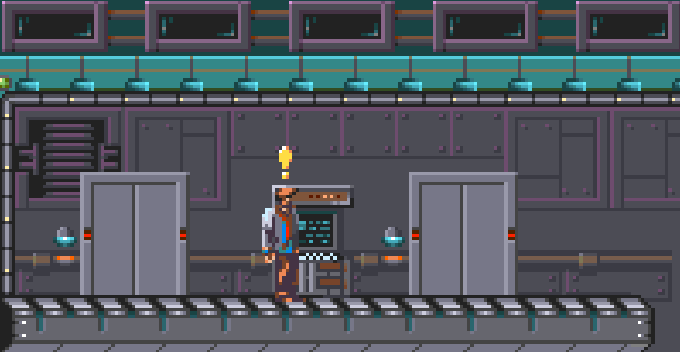
The Gate
The last progress report of the year!


Hello everyone!
Christmas is approaching and this is the last progress report of this intense year.

During this month I worked mostly on completing room 19 and room 20, these were two very complex rooms, but I was slowed down by AMOS Pro that forced me to some intense debug sessions.
HAVE I REACHED AN AMOS PRO LIMIT?
Here is the story: the two script interpreters, one for the dialogues and one for the terminals, are enclosed into two procedures, they are pretty huge and some parts of the code are duplicated because they shares most script's commands.
I thought to gather the duplicated code sections and group them using additional procedures. Since these are not time critical parts, the overhead I add calling these procedures does not produce visible slow downs.
In exchange I'd had a more compact and readable interpreter code and a smaller compiled executable because of the removed duplicated code sections.
Well, at least that was the plan.

While changing the code and testing the results, AMOS Pro got mad and started to throw strange errors, without meaning and without apparent reasons.
Editing the code to remove my changes was useless: the source was, for some reason, broken and the errors continued to pop out even if the code was reverted to its original state.
I was forced to return to a previous version and, since I needed to understand if I reached some AMOS limits, I started with this time-consuming loop:
- Make a small change in the source
- Save it with another name
- Test
It worked until, once again, I reached a point where the errors started to pop out again.
After 3 days I gave up. I will live with duplicated code, at least for now.
FIRST BOSS
Well, don't expect huge bosses!
I had to rewrite all the boss frame sheets to reduce its size because it was slowing down everything.
There are so many things running in the background so I cannot create big baddies.
Anyway room 19 has been completed and it contains this weird enemy that Kal must defeat.

For some reasons, in the compiled executable, the range was not correctly calculated when the sensing range multiplier was a floating point number. I fixed this problem forcing the involved variables to be in floating point format.
The boss required a new brain script so I had to increase the loaded brains, but I also increased the maximum brain script's length.
I added the command brain script's command FIX, it allow the enemy to correct its position when its fall out of the allowed area. This command was already planned but not yet implemented.
In room 19 there is also a Palette Glitch effect in action, it is used to simulate broken neon lights affecting the entire room's palette.
I expanded this effect so that it can also accept a map variable where the effect's state is stored and reloaded when entering the room to keep consistency when exiting and re-entering the room.That's needed because Kal can interact with these light effects pushing buttons, switches (throught dialogues) and amybe also interacting with hidden triggers (walking on something for example).
The map variable is initialized to the value defined in the initialization statement only when it's the first time we enter the room.
MORE SOUNDS
I finally added the door's sound effects! Now interacting with doors produce a different sound for:
- Door opening
- Door closing
- Door locked (by a terminal)
- Door requiring a key that Kal's does not yet have.
Since we are talking about sounds, well, the music bug was not really resolved but now it is finally fixed. When there was a module playing in the background (music or ambient sounds) and the player entered the game menu (which have its own music), in the moment that the player exited the game menu, the game was shutting down the menu music without resuming the room's one.
I adjusted some variables to manage and resume the previous playing music which now is reloaded and restarted.

Another small part of room 19.
COLLIDING PALETTES!
With the color effects I lately introduced, I noticed broked palettes when exiting from the terminals.
This was happening because I already used one of the custom palette slots (AMCAF extension) to handle the terminal color glitch effect.
I resolved creating two procedures: one to backup all the custom palettes and one to restore them so custom palettes are not messed up after exiting a terminal or after having used the EMP device (spoiler!!).
MORE ABOUT SCRIPT COMMANDS
I don't want to bore you with all the changes, I'll list here only the most important changes and bug fixes:
- Changed the [PS=nn] command to accept any number length, before it was requesting a fixed length of 2 characters (PS stands for PAUSE).
- All the user's input routine used in the scripts has been modified to check the user's input and to flash the screen when something is not accepted: for example you are prompted to enter a number and you type a letter the screen will flash red.
- The input routines in the dialogue commands now handle the backspace, exactly like I did some time ago for the terminals.
- The input routines now discard any non-printable characters, previously small squares where printed instead.
- I needed some sorcery to let Kal to pick up keys during terminal sessions so I added the [GETKEY …] command to terminal interpreter, like I previously did with dialogues.
- I added the possibility to trigger a dialogue with the [SPECIAL ...] command after exiting from a terminal. This is useful to let Kal say something after a terminal session.
BACKGROUND ANIMATIONS
Since I can only use 7 background animations at fixed positions per room, I thought to expand a bit this functionality adding the ability to set a random position within a range for each animation loop.

I felt the need for this additional feature because I wanted to add bubbles animations in the container you see in the above image. With this addition I'm to add bubbles animations at random position within (over) a glass container, giving the illusion that there is much more animated stuff.
The X and Y arguments are used for the fixed position but now I can also specify an area with the format start:size to define a range.
For example, to play the animation in the area (100,140)-(120,180) I have to use 100:20 for the X and 140:40 for the Y.

OTHER STUFF
- Fixed a small bug that was leaving the killed enemies in the background when re-entering the room, the command Update was missing after the enemies states loading.
- Fixed a couple of bugs in the dialogue scripts.
- Fixed a bug causing a division by zero, it was in the MOVE RANDOM enemy's script command.
So that's it, I'm doing my best to deliver the game as soon as possible but htere are two obstacles:
1. Life stuff
2. The fact that I'm very picky with the results
ROOM 20 PREVIEW
Here is a small video I recorded so you can have a peek at room 20 where some really bad guys live.
You can see the bubbles animations in the green glass cylinders that I was talking about above.
WARNING! YouTube destroyed the frame rate, for a better video watch the one on Patreon (here).
CONCLUSION
I send you all a huge hug and wish you all a Merry Christmas and a Happy New Year!
Comments
Log in with itch.io to leave a comment.
That’s a great update thanks for sharing. It really is great to see you making excellent progress with this AMOS PRO game! Truly remarkable…